Todo App (MUI Plugin)
Overview
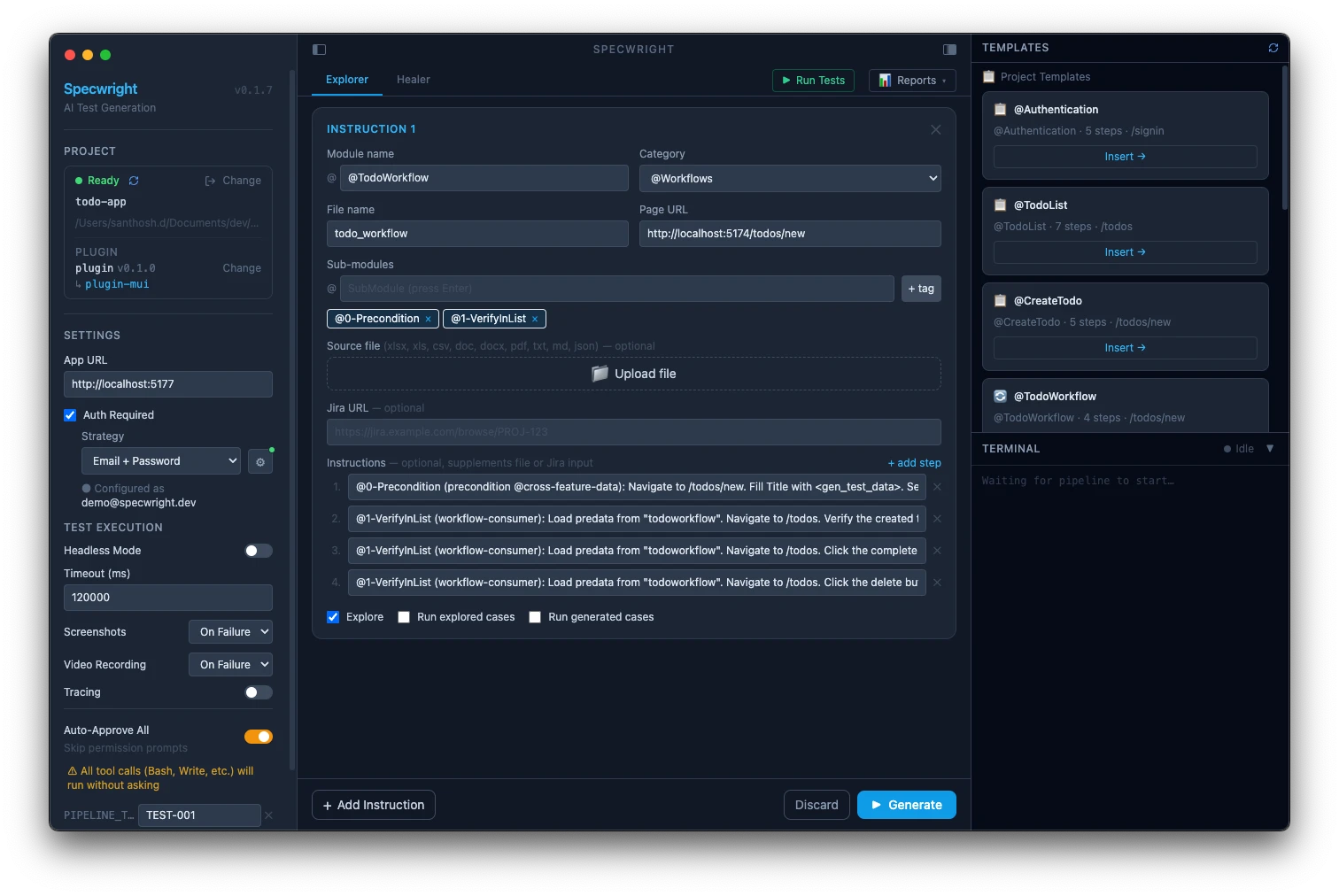
The Todo App is a React + Vite application using Material UI. It demonstrates @Workflows tests across MUI components — Select, Autocomplete, Snackbar, and Dialog — using the @specwright/plugin-mui overlay installed on top of the base plugin.
Source: apps/examples/todo-app/
What this demo covers
@Workflowswith MUI component interaction (Select, Autocomplete, Snackbar, Dialog)@specwright/plugin-muioverlay installed on the base plugin@TodoWorkflowwith 1 precondition phase + 3 consumer scenarios all loading the same predata- localStorage snapshot in the precondition phase (required for MUI state persistence)
- MUI Dialog for delete confirmation flow
Setup
cd apps/examples/todo-app
pnpm install && npx playwright install chromium
# Credentials are pre-filled for the demo — no edits needed
pnpm dev   # starts on port 5174
Auth: email-password — demo@specwright.dev / Specwright2026!
Instructions config
{
  moduleName: '@TodoWorkflow',
  category: '@Workflows',
  subModuleName: ['@0-Precondition', '@1-VerifyInList'],
  fileName: 'todo_workflow',
  pageURL: 'http://localhost:5174/todos/new',
  instructions: [
    '@0-Precondition (precondition @cross-feature-data): Fill Title with <gen_test_data>. Set Priority to High using the MUI Select. Type "Work" in Category Autocomplete and select it. Click Create Todo. Verify snackbar appears. Save title as predata "todoworkflow". Snapshot localStorage.',
    '@1-VerifyInList (workflow-consumer): Load predata. Navigate /todos. Verify todo appears with correct title. Verify Priority chip shows "High".',
    '@1-VerifyInList (workflow-consumer): Load predata. Click complete checkbox — verify checked. Switch to Completed filter tab — verify todo appears.',
    '@1-VerifyInList (workflow-consumer): Load predata. Click delete — verify MUI Dialog appears. Click Confirm — verify todo removed from list.',
  ],
  explore: true,
  runExploredCases: false,
  runGeneratedCases: false,
}
Why localStorage snapshot matters
MUI components in this app persist the todo list in localStorage. Consumer phases (@1-VerifyInList) start with a fresh browser context — without the localStorage snapshot taken in @0-Precondition, the created todo is gone by Phase 1 and all consumer scenarios fail.
The Snapshot localStorage instruction in the precondition phase saves the full localStorage state into predata. Consumer phases restore it via Load predata before navigating, so the todo created in Phase 0 is available in each consumer's browser context.
This pattern is required for any workflow test where the precondition creates data that is stored client-side rather than server-side.
Running with /e2e-automate
# Open the project in Claude Code
claude .

# Run the full pipeline
/e2e-automate
The pipeline explores the app, validates the instructions config, generates BDD feature files and Playwright step definitions, then heals any failures.
Running generated tests directly
Once tests have been generated:
pnpm bddgen && npx playwright test \
  --project setup \
  --project precondition \
  --project workflow-consumers \
  --grep "@TodoWorkflow"
The setup project handles authentication. precondition runs @0-Precondition and saves predata + localStorage snapshot. workflow-consumers runs all three @1-VerifyInList scenarios in parallel, each loading the snapshot.